


20+ Must-Have Features for a Modern News App in 2026
Table of Contents
What Makes a Modern News App Different?
News App Features You Should Consider
Feature Priority at a Glance
How to Prioritize News App Features for an MVP
How These Features Affect News App Development Cost
How to Choose the Right Features for Your News App
How CodeAegis Approaches News App Feature Planning
Conclusion
Frequently Asked Questions
 Add us as a preferred source on Google
Table of Content
+20+ Must-Have Features for a Modern News App in 2026
Puzzles, practical service content, and personalized digests are increasingly winning the daily attention battle against straight news coverage. That’s not a signal that news apps are becoming less relevant. It’s a signal that the apps winning attention are the ones built around discovery, relevance, and format flexibility, not just a feed of headlines.
A recent study on digital news consumption highlights the growing importance of personalized, real-time, and multimedia experiences that are reshaping how modern news apps are built.
The shift is already visible in how publishers are building. Research from the World Association of News Publishers found that 62% of European publishers now use AI for personalized content recommendations, a number that’s only climbed since. A modern news app in 2026 is expected to do considerably more than deliver articles. Readers expect a personalized feed, real-time alerts the moment a story breaks, offline access on a commute, native audio and video, and increasingly, AI-driven recommendations guiding what they see first. Publishers, meanwhile, need the app to support editorial workflows, subscriptions, analytics, and content moderation on the backend, not just a polished interface up front.
This piece walks through more than 20 news app features that matter in 2026: what each one actually does, why it matters to users and to the business running the app, and whether it belongs in a first release or a later one. If you’re earlier in the planning process, our news app development guide covers the broader architecture and process decisions this feature list builds on. Consider this the practical reference for scoping the build itself.
What Makes a Modern News App Different?
The shift in news app expectations over the past few years has been less about adding features and more about changing what “delivering news” actually means. A basic feed that lists articles in reverse chronological order used to be sufficient. It no longer is, because readers now compare that experience against apps that learn their habits, surface what matters to them specifically, and notify them the instant something relevant happens.
Why Feature Selection Matters for News App Development
Every feature added to a news app carries a cost beyond the initial build: ongoing maintenance, additional infrastructure, and in some cases entirely new operational processes like content moderation or editorial approval chains. Choosing the wrong features to prioritize doesn’t just waste the development budget. It delays the point where the app actually reaches users and starts generating the feedback needed to know whether it’s working. Feature selection is, in practice, a sequencing decision as much as a scoping one.
MVP vs. Advanced News App Features
That shift has split news app functionality into two rough categories. There are features that form the core experience: a working feed, categories, search, and a way to save articles for later. Then there are features that layer intelligence, real-time infrastructure, and monetization on top: AI-driven personalization, live streaming, subscription paywalls, and detailed analytics. A first version of a news app rarely needs both categories at once, and building all of it simultaneously is usually where budgets and timelines get away from teams.
20+ Essential News App Features You Should Consider
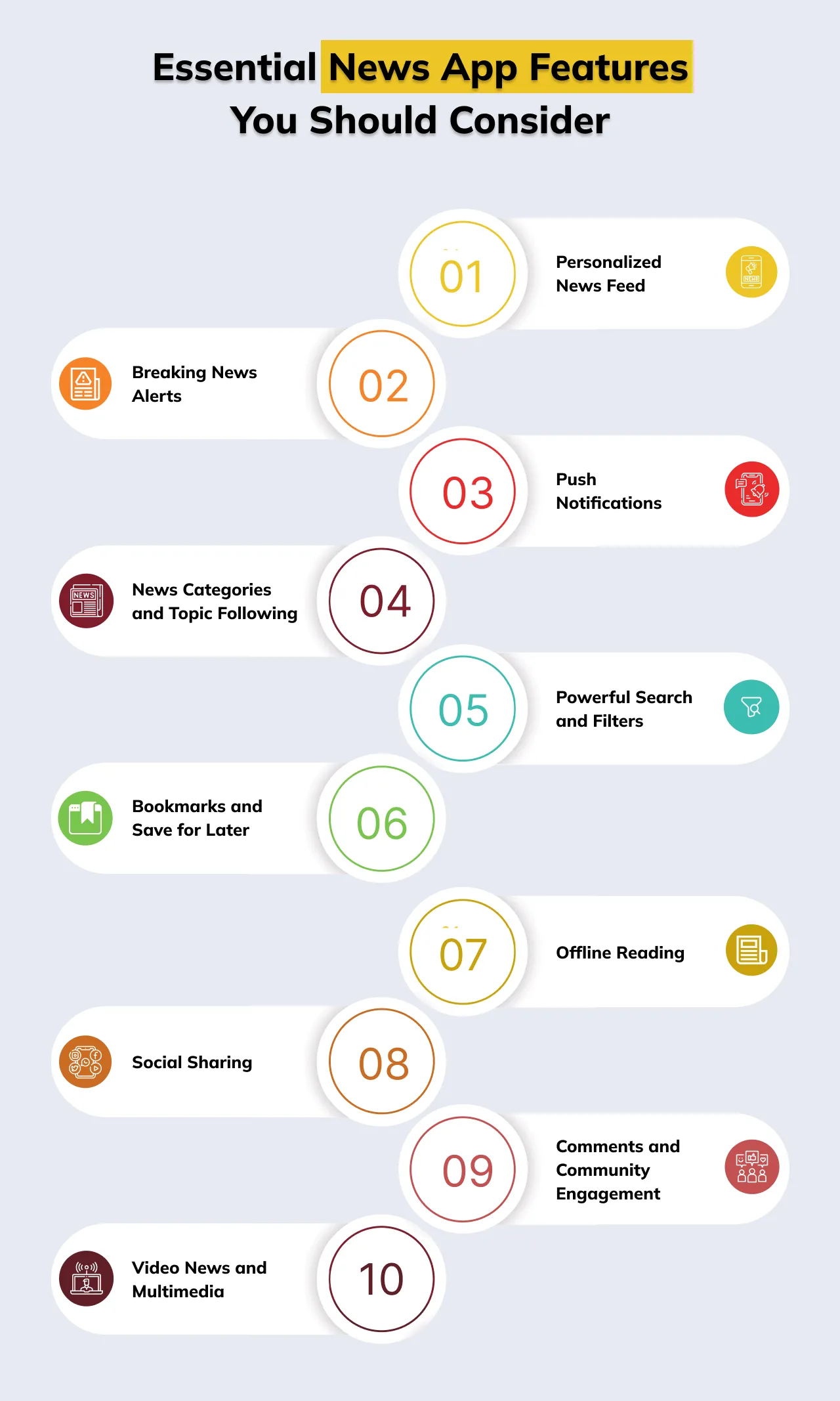
1. Personalized News Feed
A personalized feed ranks and filters content based on a reader’s interests, reading history, and behavior rather than showing every user the same homepage. It’s the feature most tied to retention, since a feed that feels relevant is the reason someone opens the app a second time.
Early versions can rely on declared preferences, categories the user picks during onboarding, while more advanced versions track actual reading behavior to refine the feed continuously.
2. Breaking News Alerts
These are time-sensitive notifications sent when a major story develops, distinct from routine push notifications in both urgency and frequency. Getting this right matters because breaking alerts are one of the primary reasons users keep a news app installed instead of relying on social media. The implementation consideration is restraint: alerts sent too often for stories that aren’t genuinely urgent train users to ignore or disable them entirely.
3. Push Notifications
Broader than breaking alerts, general push notifications cover personalized story recommendations, followed-topic updates, and re-engagement nudges. Done well, they bring lapsed users back. Done poorly, they’re one of the top reasons people uninstall news apps. Segmentation by user interest and behavior, not blanket blasts, is what separates the two outcomes.
4. News Categories and Topic Following
Letting users browse by category (politics, sports, business, and so on) and follow specific topics gives them direct control over their feed composition without needing full AI personalization. This is often the first layer of personalization a news app ships, since it’s straightforward to implement and gives users an immediate sense of control.
5. Powerful Search and Filters
Search needs to handle both keyword queries and filtering by date, category, or source. For any app with an active archive of published content, this is not optional. The technical consideration is indexing: a search function that only queries recent articles frustrates users looking for something published weeks earlier.
6. Bookmarks and Save for Later
A simple feature that lets users save articles to revisit, often for reading during a commute or after work. It supports return visits and gives editorial teams a useful signal for which stories have lasting value beyond the first few hours after publication.
7. Offline Reading
Saved or recently viewed articles get cached locally so users can read without an active connection. This matters more than it initially appears, since a meaningful share of news consumption happens during commutes, flights, or in areas with unreliable connectivity.
Implementation requires deciding what gets cached automatically versus what requires manual saving, and managing storage limits sensibly.
8. Social Sharing
Native sharing to social platforms and messaging apps extends an article’s reach beyond the app itself and functions as a low-cost acquisition channel. The implementation detail that’s easy to overlook is generating clean preview cards, headline, image, summary, so shared links look credible rather than broken on the receiving platform.
9. Comments and Community Engagement
Comment sections let readers discuss stories directly within the app. They increase time spent in-app but introduce real moderation overhead, which is why this feature is often deferred past MVP or launched with tighter moderation controls than a mature platform would eventually need.
10. Video News and Multimedia
Embedded video, image galleries, and rich media within articles meet a growing share of readers who prefer visual formats over long-form text. The technical consideration is media delivery: video needs adaptive streaming and a CDN to avoid buffering, which adds infrastructure cost beyond a text-only app.
11. Live News Streaming
Real-time video streaming for breaking events, press conferences, or scheduled programming is one of the more resource-intensive features on this list, requiring low-latency streaming infrastructure and the ability to handle unpredictable traffic spikes when a major event draws a sudden audience surge.
12. Podcasts and Audio News
Native audio playback for news podcasts or narrated articles serves users who consume news during activities where reading isn’t practical, driving, exercising, or doing chores. Building this in-app, rather than pointing users to a separate podcast app, keeps engagement inside your product.
13. Multilingual Content
Supporting multiple languages, either through separate editorial content or automated translation, extends a publisher’s addressable audience significantly. Automated translation is faster to implement but carries a real risk to editorial accuracy, particularly for nuanced political or technical stories, so many publishers reserve full automation for select content types.
14. Dark Mode and Accessibility
Dark mode reduces eye strain during low-light reading and has become close to a baseline expectation rather than a differentiator. Broader accessibility, screen reader support, adjustable text sizing, sufficient color contrast, matters for both user experience and, in many markets, regulatory compliance.
15. AI-Powered Recommendations
Beyond basic personalization, AI recommendation engines analyze reading depth, click patterns, and time spent per article to continuously refine what a specific user sees. This requires meaningful data volume to perform well, which is why it’s generally an advanced feature added once an app has an established active user base rather than a day-one requirement. It’s also the feature category seeing the fastest investment industry-wide right now, as publishers race to make personalization feel less like a filter and more like an anticipatory layer over the entire app.
16. Voice Search and Voice News
Voice-driven search and audio narration of articles support hands-free consumption and improve accessibility for visually impaired users. Adoption has grown as speech recognition has improved, though it remains a feature best added once core functionality is solid, since voice interfaces add their own testing and reliability burden.
17. User Profiles and Preferences
Persistent user accounts store reading history, saved articles, followed topics, and notification settings across devices. This is foundational infrastructure for nearly every personalization feature above it on this list, so it’s typically built early even in an MVP, even if the personalization built on top of it comes later.
18. Subscriptions and Paywalls
Subscription tiers and metered or hard paywalls gate premium content behind payment, which is the primary monetization model for a large share of digital publishers today. This is squarely business-model-dependent: a free, ad-supported app doesn’t need this at all, while a subscription-first publisher needs it from day one.
19. Analytics and Editorial Insights
Backend analytics tracking reader acquisition, engagement, retention, and per-article performance give editorial and product teams the data to make informed decisions rather than guesses. This is genuinely foundational and belongs in an MVP, since without it there’s no reliable way to know whether the app is actually working for readers.
20. Content Moderation and Reporting
Tools to flag inappropriate comments, report abuse, and enforce community guidelines protect both users and brand reputation wherever community features exist. The scope of this scales directly with how much user-generated content the app supports, minimal for a comments-free app, substantial for one with active community discussion.
21. Admin CMS and Editorial Workflow
A content management system supporting drafting, scheduling, multi-editor approval workflows, and role-based access is publisher-side infrastructure that rarely gets enough attention in feature discussions focused on the reader experience. For any publisher running an active editorial operation, this is as essential as the reader-facing feed itself.
22. Advertising and Monetization Controls
Ad placement management, sponsored content tools, and revenue tracking support publishers monetizing through advertising rather than, or alongside, subscriptions. Like subscriptions, the depth needed here depends entirely on the underlying business model.
Get a Free Consultation, Not sure, which of these features your app actually needs first? Let’s map your feature set against your audience and budget.
Feature Priority at a Glance
| Feature | Priority | Reason |
|---|---|---|
| Personalized feed | MVP / Advanced | Core discovery value; deeper personalization can follow once enough user data exists |
| Breaking news alerts | MVP | Important for timely engagement and retention |
| Search & filters | MVP | Helps users find specific stories and topics |
| Bookmarks / offline reading | MVP | Supports return visits and reading convenience |
| Video / live streaming | Advanced | Adds engagement but increases media infrastructure complexity |
| AI recommendations | Advanced | Improves personalization but requires data, testing, and governance |
| Subscriptions / paywall | Business-model dependent | Essential when premium content is part of the revenue strategy |
| CMS & editorial workflow | MVP for publishers | Supports publishing, scheduling, roles, and content operations |
| Analytics | MVP | Needed to understand acquisition, engagement, retention, and content performance |
How to Prioritize News App Features for an MVP
A well-scoped MVP typically includes a working feed, category browsing, search, push notifications, bookmarks, basic user profiles and preferences, analytics, and the essential CMS and API capabilities a publisher needs to actually operate the app. These features form a coherent, usable product on their own, and they generate the usage data needed to make informed decisions about what to build next.
Features like AI personalization, live streaming, advanced multimedia, subscriptions, and voice search are better treated as later additions or as dependent on the specific business model. AI recommendations, for instance, need real usage data to train against, data that doesn’t exist before launch. Subscriptions only make sense once there’s a defined premium content strategy. Building these into version one, before validating that users actually want the core product, is a common way MVP budgets balloon past what was originally planned.
How These Features Affect News App Development Cost
Not all features add cost equally. Real-time functionality (breaking alerts, live streaming), AI-driven personalization, rich multimedia support, subscription billing, and custom CMS workflows each require additional infrastructure, data pipelines, or third-party integrations beyond a basic content app. A feed and category browser is relatively inexpensive to build. A recommendation engine that improves with usage, or a live-streaming pipeline that handles traffic spikes during major events, adds meaningfully more engineering time and ongoing infrastructure cost.
This is one of the main reasons a detailed feature list matters more than a general project description when getting a quote. Two apps both described as “a news app with personalization and video” can land at very different price points depending on how deep that personalization goes and whether video means embedded clips or full live streaming. For a detailed breakdown of how these decisions translate into actual pricing, our guide on news app development cost covers the full range by feature tier and platform choice.
How to Choose the Right Features for Your News App
Feature selection should start with the audience and content model, not a competitor’s feature list. A hyperlocal publisher covering one city has very different needs than a national outlet publishing across dozens of categories, and a video-first news brand needs different infrastructure than a text-first one.
The revenue model matters just as much. A subscription-first strategy needs paywalls and account infrastructure early. An ad-supported model needs monetization controls and analytics tuned toward traffic and engagement rather than conversion. Geography and platform choice affect decisions around multilingual support and offline reading, particularly for publishers operating in regions with inconsistent connectivity. Editorial workflow needs should be scoped directly with the newsroom, since a CMS built without their input tends to get workarounds bolted on after launch. Scalability, privacy compliance, and accessibility round out the framework, and each deserves consideration at the architecture stage rather than as an afterthought once the app is already in front of users.
How CodeAegis Approaches News App Feature Planning
Choosing the right feature set is rarely a solo decision, and getting it wrong is an expensive mistake to correct after launch. Here’s how CodeAegis works through it with publishers.
Feature Prioritization Grounded in Your Content Model
Rather than starting from a generic feature checklist, CodeAegis begins by understanding your audience, content type, and revenue model, then maps that against the MVP-versus-advanced framework covered throughout this guide. The result is a feature list built around what your specific publication actually needs at launch, not a list borrowed from a competitor’s app.
Editorial Workflow Built Into the Architecture
Publisher-side infrastructure, the CMS, role-based access, content scheduling, gets designed alongside the reader-facing app rather than bolted on afterward. This matters most for newsrooms with existing editorial processes, since a CMS that fights against how your team already works creates friction that shows up every single day post-launch.
Scalable Foundations for Advanced Features
Even when AI personalization, live streaming, or subscriptions are planned for a later release, the underlying architecture is built to support them without a rebuild. This avoids the common trap of an MVP that needs to be re-architected from scratch the moment a publisher is ready to add advanced functionality.
Transparent Scoping Tied to Cost
Every feature discussion is tied directly to what it means for timeline and budget, so decisions about what goes into version one versus version two are made with full visibility into the trade-offs, not after a quote arrives that doesn’t match expectations.
Conclusion
The right feature set for a news app isn’t the longest possible list. It’s the set of features that matches your specific audience, content model, and business goals, built in the right order so each release generates the data and validation needed for the next one. A well-scoped MVP with strong core functionality tends to outperform an overbuilt first release every time. If you’re planning a feature-rich news platform, CodeAegis helps publishers and businesses design, prioritize, and build scalable news and media app development services tailored to their audience and growth goals.
Planning a feature-rich news platform for 2026?-- Talk to CodeAegis
Frequently Asked Questions
What are the must-have features of a news app?
A working MVP typically needs a personalized feed, category browsing, search, push notifications, bookmarks, offline reading, basic user profiles, and backend analytics. These form a complete, usable core experience that can be extended later.
What advanced features can be added to a news app?
AI-powered recommendations, live news streaming, podcast integration, voice search, and multilingual content are common advanced additions, typically layered in once the core app is validated and generating real usage data.
How much do news app features affect development cost?
Significantly. Real-time functionality, AI personalization, rich multimedia, subscription billing, and custom CMS workflows each add engineering complexity and infrastructure cost beyond a basic content app, which is why feature depth matters more than feature count when estimating a project.
Which AI features are useful in a news app?
AI-driven content recommendations, automated tagging and categorization, and behavior-based feed personalization are the most commonly used AI features, each improving in accuracy as more user data accumulates over time.
Can a news app start with an MVP and add features later?
Yes, and this is generally the recommended approach. Launching with core functionality, validating demand, and adding AI personalization, live streaming, or subscriptions in later versions reduces both risk and upfront cost compared to building everything at once.
Do all news apps need a custom CMS?
Not necessarily. Publishers with lighter editorial volume often start with a licensed CMS to reduce upfront cost, while newsrooms with complex workflows, multiple approval layers, or high publishing volume typically benefit more from a custom-built system designed around their specific process.

With over 12 years of experience, Mansi Garg is the Chief Operating Officer (COO) of CodeAegis, specializing in optimizing business performance and ensuring operational maturity across the technology landscape. Known for designing scalable governance and quality assurance frameworks, she ensured on-time project delivery. Mansi is the true leader behind the successful execution of cutting-edge digital solutions for a diverse global clientele.