


How to Develop an iOS App: Step-by-Step Process & Checklist 2026
Table of Contents
What are iOS App Development Core Phases?
How to Develop an iOS App
iOS App Development Best Practices for Startups
Complete iOS App Development Checklist
How Long Does iOS App Development Take
How to Reduce Risk in Your iOS App Development Project
Conclusion
Frequently Asked Questions
 Add us as a preferred source on Google
Table of Content
+How to Develop an iOS App: Step-by-Step Guide 2026
Most iOS apps fail before they get a fair chance. Not because the developers were bad. Not because the idea was wrong, but the development process was wrong.
If you are a founder, product manager, or CTO trying to figure out how to develop an iOS app in 2026, here is the most important thing to understand from the start. Planning, validation, and structure are what separate apps that survive from apps that get deleted in the first week.
The Apple App Store currently offers over 1.8 million iOS and iPad OS apps available. Getting users to stay is the hardest part of all. The apps that manage to do that followed a structured iOS app development process from day one and made smart decisions at every stage.
This guide covers the complete iOS app development steps from start to finish. If you want a broader view of the landscape, our complete iOS development guide for business is a good place to start.
Let us get into it.
What are iOS App Development Core Phases?
The iOS app development process consists of all steps taken from the time you have an idea for an app until your app is an active product on the App Store and continues to function after launch.
Here are the five core phases:
- Discovery - Define the problem, the users, and what the app actually needs to do
- Design - Translate requirements into wireframes, mockups, and a testable prototype
- Development - Build the frontend, backend, and all integrations
- Testing - Make sure the app works correctly, performs well, and is secure
- Launch and Maintenance - Get the app live and keep it updated over time
For a deeper look at how a professional team handles each phase end-to-end, visit our iOS app development company page.
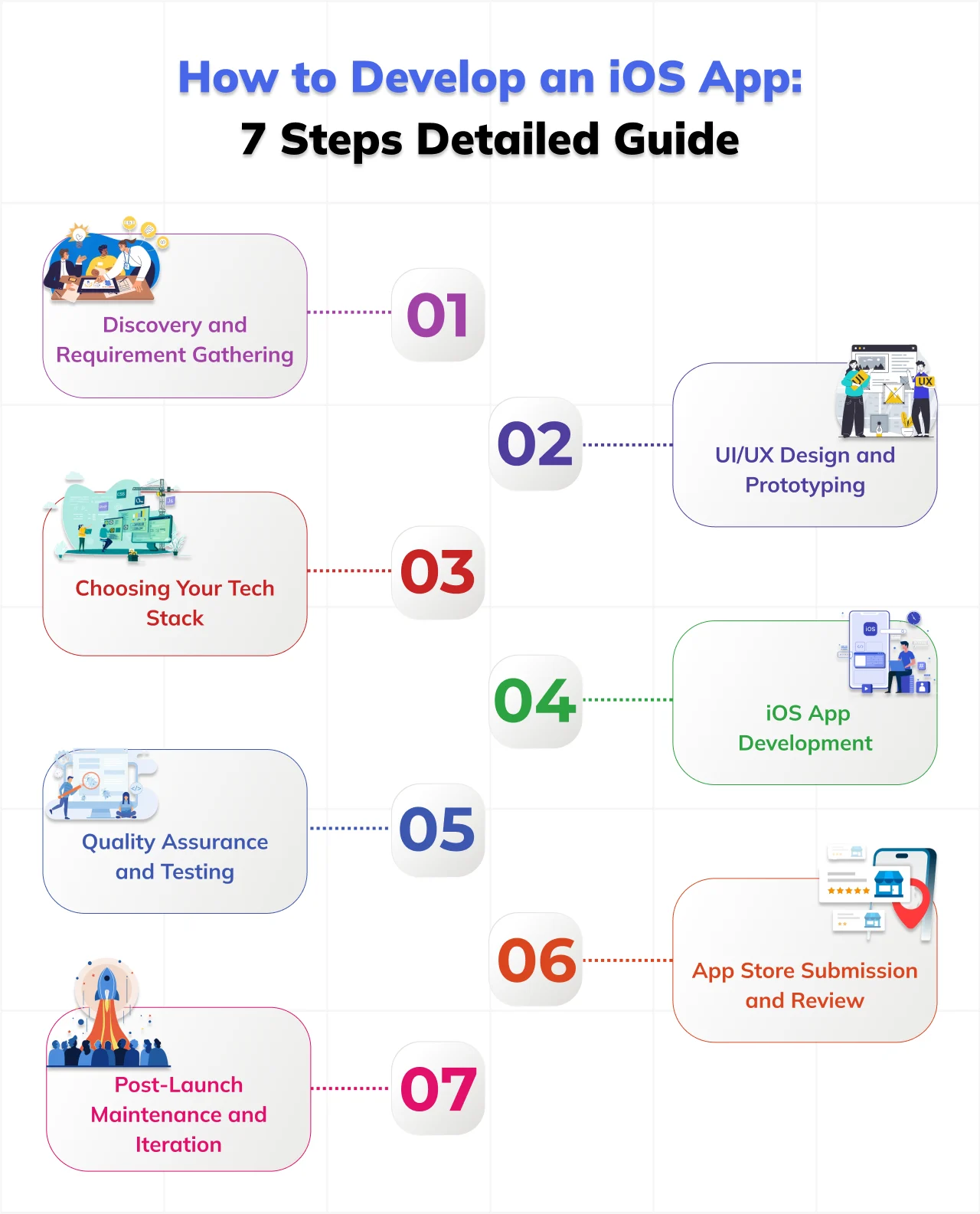
How to Develop an iOS App: 7 Steps Detailed Guide
Learning how to develop an iOS app involves more than writing code. A successful iOS app requires market validation, UI/UX planning, selecting the right tech stack, structured development sprints, App Store optimization, and ongoing maintenance after launch. Here’s complete step guide-
Step 1: Discovery and Requirement Gathering
Discovery is the phase most teams undervalue. It is also the phase most failed apps did not bother with.
The whole point of discovery is to get clear, honest answers to the questions that every other decision in the project depends on.
Good discovery means talking to potential users directly, not assuming what they want. It means researching the competitor apps that already exist and finding the specific gaps they are not filling. It means mapping the journey your target user takes today without your app, so you understand the behavior you are actually trying to change.
One of the most important outputs of discovery is feature prioritization. Every team starts with a long list of features they want to build. Discovery forces you to be honest about that list. What absolutely must exist in version one for the app to deliver its core value? What can wait for version two? What sounds nice but probably nobody actually needs it?
Step 2: UI/UX Design and Prototyping
Once you have clear requirements, design translates them into something you can actually look at, interact with, and test.
The right sequence here is important. From wireframes, move to high-fidelity mockups, get full visual designs with real colours, real fonts, real spacing, and real components. This is what your app will actually look like when it is built.
Then build a clickable prototype. A prototype is not a live app. It is a simulation that lets a real person tap through the main flows and experience the product as if it were a live app. The purpose of the prototype is not to impress investors or stakeholders. It is to test your assumptions while changes are still cheap.
Test your prototype with at least five real users before development starts. This is not a nice-to-have step. It is one of the highest-value activities in the entire project. Five users will consistently surface the majority of usability problems that no amount of internal review would catch. Finding those problems at the prototype stage costs hours. Finding them after development has started costs weeks.
Step 3: Choosing Your Tech Stack
For a business decision-maker, the tech stack conversation is not really about programming languages. It is about one strategic choice: native iOS development or cross-platform development.
Swift is the programming language used for native iOS development today; honestly, it’s the one Apple recommends, and the vast majority of quality iOS apps are built with it. Objective-C is the older language; it still shows up in legacy codebases but new projects usually pick Swift. So in the end your development team handles this choice.
The higher-level decision is really native versus cross-platform.
Native iOS development means you build specifically for Apple devices, using Swift and Apple’s own frameworks. When quality and performance genuinely matter, that native route is usually the right choice. Cross-platform frameworks like React Native or Flutter let you build for iOS and Android from a shared codebase.
A startup with a limited budget building a simple content or productivity type app can do fine with a cross-platform.
Step 4: iOS App Development
This is where the actual building happens. And the way the build is structured matters as much as the quality of the code being written.
iOS Development teams typically work for a period of two weeks called a "sprint". A sprint is a defined period during which the team commits to completing a specific amount of work. They will commit to building a specific set of features over the next two weeks, deliver a working build to the client, receive feedback on the build, and then begin the next sprint. This process allows for teams not to lose all contact with their clients over months of app development to produce something that ends up being drastically different from what was originally agreed upon.
If a development partner does not want to conduct regular check-ins with their clients, it is a good indication that you should reconsider working with them. Typically, in a project timeline, development accounts for 40% to 50% of the overall timeframe.
Step 5: Quality Assurance and Testing
QA is where the gap between a professional team and a more casual amateur one really starts to show up.
Functional testing verifies that each feature behaves as it was planned. Security testing verifies that personal data is actually encrypted, that no one can bypass authentication, and that any money-related or payment features meet Apple's security expectations and your users' reasonable expectations.
In most cases, QA takes around 15 to 20 percent of the whole project schedule. So don’t let anyone try to cut that down to squeeze a launch date. Releasing a buggy app can cause lasting harm to your standing on the App Store and taint your early user reviews. Shipping a week later is far less costly.
Step 6: App Store Submission and Review
Getting your app submitted and approved by Apple is its own process with specific requirements. Missing those requirements is one of the most common and easily avoidable causes of delay.
Apple's review process in 2026 takes about 1 to 3 business days. It involves both automated checks and a human reviewer working through your app against Apple's published guidelines.
Before you submit, make sure you have a well-written App Store listing with title, description, and keyword field all within Apple's character limits. Screenshots for every supported device size in the correct dimensions. A preview video if it helps communicate what the app does. A privacy policy and terms of service hosted on a publicly accessible URL. The correct content rating and category selection. And a completed round of beta testing through TestFlight with real users who were not part of the build team.
A first-pass rejection from Apple is not the end of the world. They give specific feedback and you can resubmit. But it adds days to your launch timeline.
Step 7: Post-Launch Maintenance and Iteration
A lot of teams treat launch day as the finish line. It is not. It is the point where the real product work begins.
From the day your app goes live, user feedback starts arriving. Real users will find flows that confuse them, features that do not work as expected, and things they wish the app could do. This feedback is the most valuable product input you will ever have access to. It should directly shape your version 2.0 roadmap.
At the same time, Apple releases a major new iOS version every September. Each new version introduces changes that can affect how your app behaves. Maintaining compatibility with new iOS versions is not optional. It is the ongoing cost of having a live product. Any budget that does not account for annual maintenance will eventually produce a broken app with no plan to fix it.
What are iOS App Development Best Practices for Startups?
Explore the advantages of choosing iOS for your business to understand why the platform continues to deliver strong returns for businesses that build on it properly.
Start with an MVP, not the complete product
The apps that are most successful right now launched with way less than they have today. An MVP lets you test your main idea with real people, before you drop your whole budget into it. Honestly, it’s not really a compromise, more like a smart way to go forward.
Design for iOS specifically.
When teams take Android patterns and adapt them to iPhone, the result can feel a bit off, like it was never truly meant for iOS. iOS users tend to expect very specific behaviors from apps. Hitting those expectations really starts with building for iOS from the ground up, not by reworking something later.
Take App Store Optimization seriously from day one
Your app listing is basically the first handshake a future user gets. If your screenshots look weak and your keyword strategy is not tight, downloads will slip away even if your app is good.
Build for accessibility from the beginning
Voice-Over support, good color contrast, and layouts that are easy to move through help everyone, not a subset. In a few regions, accessibility rules are now a legal thing. Waiting and patching later is costly, and it can also take way more time than people expect.
Budget for Apple's annual iOS updates before you launch
Every year, Apple changes things. Apps that are not updated to accommodate those changes stop working correctly. Build the maintenance budget up front.
Evaluate development partners on their work
Ask for App Store links to apps they have built. Download them. Read the user reviews. A team's ability to navigate real submission, real QA, and real post-launch support is what matters. Portfolios do not show you that.
Complete iOS App Development Checklist
Work through this iOS app development checklist phase by phase. Any unchecked item is a risk that needs to be addressed before you move forward.
Pre-Development
- App idea validated through direct conversations with real target users
- Competitor apps researched and specific gaps documented
- Features split into must-have for version one and post-launch additions
- Budget and timeline agreed by all stakeholders before work begins
- Development partner selected based on live App Store work
Design Phase
- Wireframes reviewed and approved by the product owner
- High-fidelity mockups completed for all core screens
- Prototype tested with at least five real users outside the internal team
- Apple Human Interface Guidelines applied throughout the design
- Accessibility requirements included in the design specifications
Development Phase
- Tech stack confirmed and documented before the build starts
- All third-party integrations scoped, estimated, and contracted
- Sprint plan agreed with the development team and shared with stakeholders
- Security protocols defined before any code is written
- Analytics and crash reporting integrated from the first build
Pre-Launch
- App Store listing copy written within Apple's character limits
- Screenshots prepared for all required device sizes
- Privacy policy and terms of service live on a public URL
- Beta testing completed on TestFlight with real external users
- App submitted with correct age rating, categories, and content declarations
- Post-launch maintenance plan and budget confirmed before launch
How Long Does iOS App Development Take?
The timeline for how to develop an iOS app depends on app complexity, integrations, feature scope, and team size.
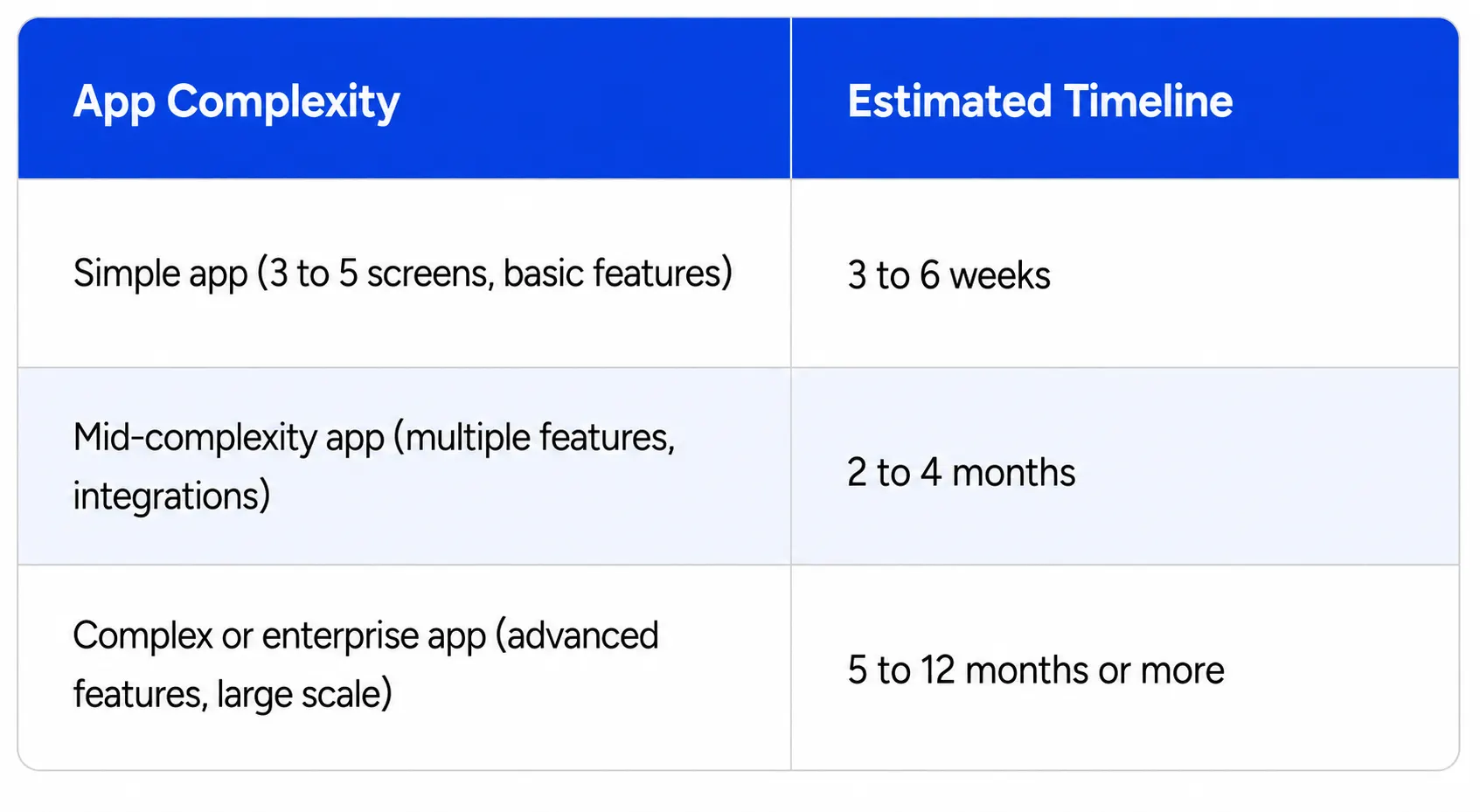
Always build in buffer time between feature completion and App Store approval. Teams that plan their launch date around the last day of development consistently get caught out.
For a full breakdown of investment at each stage, read our guide on how much iOS app development costs.
How to Reduce Risk in Your iOS App Development Project
Every iOS app development project carries risk. Timelines slip. Requirements change. Integrations behave unexpectedly. Features that seemed simple turn out to be complicated.
Here is how to reduce the most common risks before they become real problems.
Validate the idea before you fund the build
The biggest risk in any app project is building something nobody wants. Before you invest in development, talk to the people you are building for. Not friends and family who will tell you it is a great idea. Real potential users who have no reason to be polite. Find out whether they actually experience the problem your app is trying to solve, how they currently deal with it, and whether they would genuinely use your solution.
Define the scope before the contract gets signed
Scope is the most common reason iOS app projects run over budget and schedule. It shows up when people add features mid-project, without adjusting the timeline or budget to accommodate the sudden change in expectations. The remedy is a clearly documented scope that both sides agree on, before development even begins. Not some blurry “features list” inside a proposal, but an actually specific, prioritized breakdown of what will be created in version one.
Don’t make big decisions while development is happening
Development is usually not the place to reconsider your core product direction. When major decisions are made during a live build it causes real disruption. Developers lose time, some earlier work can need to be reversed, and the team can lose momentum. So make the major calls during discovery and design. Trust that method and keep the development phase for execution.
Plan your budget with a contingency built in
No iOS app development project ever runs exactly on rails the way you imagine it. Unexpected technical stuff comes up, and sometimes the third-party APIs act differently than what their documentation says. QA also tends to find issues that take longer to fix than planned, which adds a quiet pressure. A budget with no contingency is basically a budget that gets exceeded.
Get a development partner who communicates clearly
Bad communication is tied to more failed app projects than most people want to admit, even if technical skill is important. If a team goes quiet for two weeks, gives foggy updates or avoids the hard conversations, you will have trouble steering things back when problems show up. Before you even hire, watch how responsive and clear they are during the sales stage.
Test with real users throughout the build
Most teams treat user testing as something you do right before launch, like a final checkbox. The smarter approach is to include real users at several moments during development. Share working builds with a small group of your target users right after major sprints end. Their feedback at that point is usually much easier to address than the entire product is already built.
Conclusion
Knowing how to develop an iOS app the right way can significantly reduce product risk, avoid unnecessary development costs, and improve long-term App Store success.
CodeAegis is a custom iOS app development company that builds iOS products for startups, growing businesses, and enterprise teams. We have helped clients across fintech, healthtech, edtech, logistics, and consumer markets take their ideas from concept to the App Store and beyond.
We follow every step of the process outlined in this guide on every project we take on. Discovery, prototyping, structured development sprints, thorough QA, proper App Store submission, and ongoing post-launch support.
If you are planning to build an iOS app, talk to the CodeAegis iOS development team today. We will help you work out exactly what to build, how long it will realistically take, and what it will cost, before you commit to anything.
Frequently Asked Questions
1. How to develop an iOS app from scratch?
First of all, developing an iOS application from scratch presupposes idea validation and market analysis. Then, one needs to consider the required features. Next, you can proceed with the UI/UX design and coding process until the launch of your product.
2. What are the main iOS app development steps?
iOS app development includes the main stages, namely discovery, requirements gathering, UI/UX design, development, testing, app store deployment, and maintenance.
3. How long does the iOS app development process take?
The development duration varies depending on the number of features included in your application and its complexity. A simple iOS app will take several weeks, whereas the development period of a complicated product might reach several months. An efficient iOS app development process can help save time.
4. What programming language is used to develop iOS apps?
Swift is the programming language recommended for the iOS app development by Apple Inc. It is official, and developers prefer it because of its efficiency. Some products still use Objective-C, but not many people choose it these days due to the limitations.
5. What are the most important iOS app development best practices?
Some of the most important iOS app development best practices include starting with an MVP, designing specifically for Apple users, following Apple Human Interface Guidelines, prioritizing security, testing with real users, and planning for long-term maintenance. These practices help improve user experience and App Store performance.
6. Why is an iOS app development checklist important?
An iOS app development checklist helps teams stay organized throughout the project lifecycle. It ensures that important tasks such as requirement validation, testing, security reviews, App Store assets, and post-launch planning are completed before release. Using a checklist also helps reduce missed requirements and launch delays.
7. Should startups choose native or cross-platform iOS app development?
The decision depends on budget, timeline, and product goals. Native iOS development offers better performance, smoother user experience, and stronger integration with Apple devices. Cross-platform frameworks can reduce development costs for startups that need both Android and iOS apps quickly. The right choice depends on the complexity of the product and long-term scalability plans.
8. How much does it cost to build an iOS app?
The cost of building an iOS app varies based on features, integrations, UI complexity, backend infrastructure, and development team location. Simple apps are generally more affordable at cost of $20,000, while enterprise-grade platforms with custom functionality require a significantly larger investment of $50,000. Working with an experienced custom iOS app development company can help create a realistic budget and development roadmap.

Sakshi Aggarwal is the Co-CEO of CodeAegis, a visionary leader with 12+ years of experience in transforming complex business requirements into high-impact technology solutions across industries. Her core contribution lies in architecting the company's customer-centric service delivery model and optimizing cross-functional execution. She has become a driving force for ensuring project success and cultivating a culture of accountability across the software development life cycle.